YouTube Shorts Thumbnail Downloader — save the thumbnail of any Short, no sign-up
Paste a Shorts link (or a plain video ID) and get every thumbnail size YouTube has for that Short, each with its real resolution and a clean filename. Free, unlimited, no account.
Available sizes honest labels
How to download a YouTube Shorts thumbnail
- Copy the link of the Short (Share, then Copy link, or the address bar on a computer).
- Paste it into the box above and press Get thumbnails.
- Download the largest size in the list, or copy its direct image URL.
What you get from a Short
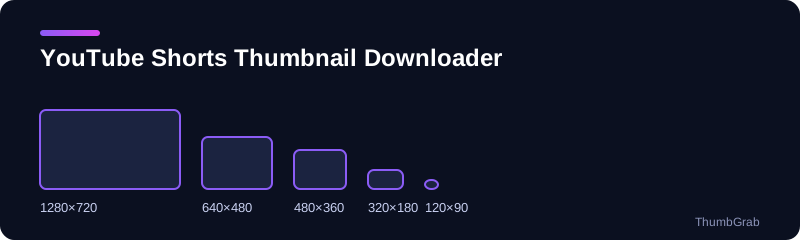
Every Short has a video ID, and YouTube stores the same family of preview files for it as for any other video. On a real Short we found all five sizes: 1280×720, 640×480, 480×360, 320×180 and 120×90. ThumbGrab shows the real resolution of each one and marks any that do not exist, so you always know what you are saving.
Tips for Shorts thumbnails
- Choose the biggest size in the list for anything you publish.
- Check the preview next to each size before you download it.
- Keep the downloaded filename, since it carries the title and the resolution.
Why use ThumbGrab for Shorts
Many thumbnail sites hand you a gray 120-pixel placeholder when the HD file does not exist, and bury the download button under popups. ThumbGrab checks every file, shows its real resolution and offers only what is there. Nothing opens by itself, there is no account, and every result panel has a close button. It works the same on a phone and on a computer, so you can save the thumbnail of a Short right after you copy its link.
Why people download Shorts thumbnails
A Short is easy to publish and easy to lose track of. Channels that post several Shorts a week often want a record of the cover image of each one, for a portfolio, a content calendar or a report to a client. Others study the Shorts of a competitor to see which opening frames get used. A dedicated YouTube Shorts thumbnail downloader saves the time of opening each Short, pausing at the right frame and taking a screenshot that never matches the original quality.
How a Short's thumbnail is stored
A Short has the same kind of video ID as any other video, and YouTube keeps the usual ladder of preview files for it: 1280×720, 640×480, 480×360, 320×180 and 120×90. The two 4:3 files include black bars at the top and bottom, which is simply how YouTube stores them. The largest 16:9 file is almost always the one you want. If you are checking your own work, compare the file against what you see in the Shorts shelf and on your channel page.
Common problems with Shorts thumbnails
- The Short was published a few minutes ago and only small files exist yet. Try again after a short while.
- The link is for a private or removed Short. Only public videos have thumbnails that can be fetched.
- You pasted a link to a channel or a playlist instead of a single Short. Open the Short and copy its own link.
When you want to go further, the guides below explain the sizes involved and what YouTube lets you change after publishing.
A simple workflow for a batch of Shorts
- List the Shorts you need, one link per line.
- Paste the first link, wait for the sizes and download the largest one.
- Repeat for each link, keeping the filenames, which include the title and the resolution.
- Store the files in one folder per channel or per month so they are easy to compare later.
What a cover image does for a Short
A Short plays automatically in the feed, but its cover image is what people see on a channel page, in search results, in playlists and in shared links. A clear cover makes the Short look intentional instead of random. That is why creators who publish often keep an archive of their covers, and why studying the covers of successful Shorts is a common research habit. A reliable YouTube Shorts thumbnail downloader makes that archive quick to build and easy to keep up to date.
Respect the creator
Saving a cover for reference, for a report or to recover your own work is a different thing from republishing it. If you plan to publish someone else's image, ask for permission and credit the source. The guide on thumbnail copyright below explains the basics, and it is not legal advice.
Are YouTube Shorts 16:9 or 9:16?
A Short is a vertical video, so its recommended thumbnail shape is 9:16. The preview files YouTube serves for a Short, however, follow the usual ladder of 16:9 and 4:3 files, which is why a downloader returns 1280×720 and not a tall image. The guide on the YouTube Shorts thumbnail size compares the two.
Can YouTube Shorts have a thumbnail?
Yes. Every Short has a cover image, and YouTube's help page says custom Shorts thumbnails are set in YouTube Studio on a computer. If you want to know what a Short's cover looks like right now, paste its link above. For a longer explanation see do YouTube Shorts have a thumbnail.
Can I get a Shorts thumbnail on iPhone, Android or PC?
Yes, from any browser. Copy the Short's link, paste it into the box and download the largest size. No app or extension is required.
Learn more
- How to download a YouTube Shorts thumbnail: the step-by-step method for saving a Short's thumbnail.
- YouTube Shorts thumbnail size: the official 9:16 size versus the files YouTube serves.
- How to change a Shorts thumbnail: what YouTube allows, and why to save the old one first.
- Do YouTube Shorts have a thumbnail: where a Short's cover shows up and how to save it.
- Free YouTube thumbnail downloader: the main tool for any video.
Frequently asked questions
Can I download the thumbnail of a YouTube Short?
Yes. Paste the Short's link, or its video ID, and ThumbGrab lists every thumbnail size that exists for it, each with a direct download.
Does a Shorts link work, or do I need the normal watch link?
Shorts links work as they are. A youtube.com/shorts link, a youtu.be link and a plain 11-character video ID are all accepted.
Which size should I download for a Short?
Take the largest size listed, normally 1280×720. If it is missing for that video, the 640×480 file is the next best, though it includes black bars at the top and bottom.
Is it free, and do I need an account?
It is free and unlimited, with no account, no email and no extension.
Are YouTube Shorts 16:9 or 9:16?
Shorts are vertical, so their recommended thumbnail is 9:16. The preview files YouTube serves for a Short are the usual 16:9 and 4:3 ladder, up to 1280×720.
Can YouTube Shorts have a thumbnail?
Yes. Every Short has a cover image, and custom Shorts thumbnails are set in YouTube Studio on a computer.