Download YouTube Thumbnails in HD — the 1280×720 file when it exists
Paste a YouTube link and download the full-HD 1280×720 thumbnail when the video has one. When it does not, ThumbGrab tells you and offers the best size that exists instead of a gray placeholder.
Available sizes honest labels
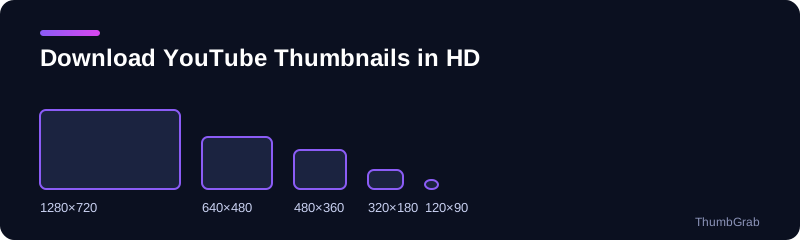
How to download a YouTube thumbnail in HD
- Copy the video link.
- Paste it into the box above and press Get thumbnails.
- Download the entry labelled 1280×720.
What if there is no HD file?
Not every video has a 1280×720 thumbnail. When it is missing, ThumbGrab says so and shows the best size that does exist, usually 640×480. It never saves a gray placeholder under an HD name.
Why HD tops out at 1280×720
YouTube's public thumbnail files are generated at up to 1280×720. A tool cannot create a bigger genuine file, so be wary of any button that promises 4K.
Tips for the best result
- Always start from the 1280×720 file and shrink it, never the other way round.
- Keep the JPG as it is, since every re-save of a JPG loses a little quality.
- Use the preview to check that you are saving the right frame.
Why this tool for HD
The word HD is used loosely on thumbnail sites. Here it means one thing: the 1280×720 file that YouTube stores for the video. ThumbGrab downloads that exact file, names it after the video, and tells you plainly when it is missing so you can pick the next best size. No popups, no redirects, no account, and no limit on how many thumbnails you save.
What HD means for a YouTube thumbnail
When people ask how to download a YouTube thumbnail in HD, they mean the 1280×720 file. It is the largest public thumbnail YouTube stores, in the 16:9 shape of a video frame and without black bars. It is generated for HD uploads and for thumbnails that are large enough, which is why older videos often lack it.
How ThumbGrab handles missing HD files
Many sites show a download button labelled HD even when the file does not exist, and quietly hand you a small placeholder. ThumbGrab reads the real resolution of every file. If 1280×720 is there, you download it; if not, the card says so and the next best size, usually 640×480, is offered, with a note that it includes black bars.
Getting the best result from the file
- Save the JPG as it arrives and avoid re-saving it many times, since each save loses a little quality.
- Shrink the image rather than enlarging it. A bigger copy of a small file only looks blurrier.
- Keep the filename ThumbGrab gives you, because it includes the title and the resolution.
Before you reuse an image
A thumbnail belongs to the channel that made it. Downloading it in HD does not give you the right to republish it, so use it for reference or with permission.
HD thumbnails for print and presentations
A 1280×720 image is plenty for a slide or a web page, but it is small on paper. At 300 dots per inch it prints at roughly 4.3 by 2.4 inches, so it suits a small card or a thumbnail in a report rather than a poster. If you need a bigger print, treat the file as a reference and recreate the design from your original source.
Why there is no 4K file
YouTube generates its public thumbnail files at up to 1280×720. A 4K-labelled download is therefore an upscaled copy of the same pixels, which looks no sharper. ThumbGrab shows the true resolution of every file instead of promising more than exists.
Keep your downloads organised
Because every download is named after the video and its resolution, a folder of HD thumbnails stays easy to search. Group files by channel or by project, and keep the original JPG untouched so you can always go back to it.
How do I save a thumbnail image from a YouTube video?
Paste the video link above, choose the 1280×720 entry and press Download. The file arrives with a descriptive name. On a phone, the guide on how to download a YouTube thumbnail on phone and PC covers each device.
Is there a 4K YouTube thumbnail download?
No genuine one. YouTube's public thumbnail files stop at 1280×720, so a 4K button gives you the same pixels enlarged. Keep the original file and shrink it rather than enlarging it.
maxresdefault vs hqdefault: which one should I download?
maxresdefault is 1280×720 and 16:9, but exists only for some videos. hqdefault is 480×360, 4:3 with black bars, and exists for every video. Take maxresdefault when it is there and fall back otherwise. The guide on maxresdefault vs hqdefault explains the differences file by file.
Learn more
- How to download a YouTube thumbnail in HD: the quick method and what HD really means.
- Download a YouTube thumbnail on phone and PC: phone and computer, no app or extension.
- Are YouTube thumbnails copyrighted: who owns a thumbnail and when you need permission.
- Maxresdefault vs hqdefault: how the two files differ and which to take.
- Free YouTube thumbnail downloader: the main tool for any video.
Frequently asked questions
Can I download a YouTube thumbnail in HD?
Yes, whenever the video has a 1280×720 file. Paste the link and choose the entry labelled 1280×720.
Is there a 4K YouTube thumbnail download?
Not from YouTube's public image files. They are generated at up to 1280×720, so any larger download is just an upscaled copy.
Do I need to install anything?
No. It is a plain web page that works in any browser on a phone or a computer, with no extension and no account.
Can I reuse a thumbnail I download?
Thumbnails belong to their creators. Downloading one does not give you the right to republish it, so read the guide on thumbnail copyright before you do.
What is the difference between maxresdefault and hqdefault?
maxresdefault is 1280×720 and 16:9 but only exists for some videos. hqdefault is 480×360, 4:3 with black bars, and exists for every video.
How do I save a thumbnail image from a YouTube video?
Paste the video link into ThumbGrab, choose the largest size and press Download.