YouTube Thumbnail Sizes Explained
YouTube keeps several renders of every thumbnail, each with its own file name. Here is what each one is, how big it is and when to use it.
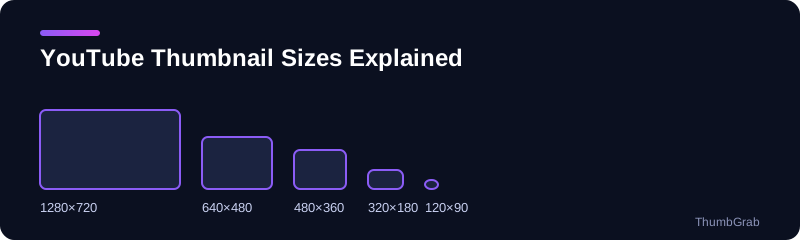
| File | Resolution | Ratio | Exists for |
|---|---|---|---|
| maxresdefault | 1280×720 | 16:9 | HD uploads |
| sddefault | 640×480 | 4:3 | Almost all videos |
| hqdefault | 480×360 | 4:3 | Every video |
| mqdefault | 320×180 | 16:9 | Every video |
| default | 120×90 | 4:3 | Every video |
The black bars
The 640×480 and 480×360 files are 4:3, but video is 16:9, so YouTube adds black bars at the top and bottom. We measured this on real videos: the top rows of sddefault and hqdefault are pure black, while maxresdefault has none. If you need a clean 16:9 image, use 1280×720 or 320×180.
Which size for which job
- Blog posts, documents, analysis: 1280×720.
- Older videos with no HD file: 640×480, then crop the bars if you need to.
- Lists and previews: 320×180, which is 16:9 and needs no cropping.
- Tiny fallbacks: 120×90.
Filename does not equal size
A file's name is a label, not a guarantee. When a video has no HD render, some sites serve a small placeholder under the maxresdefault name. ThumbGrab reads the real resolution of each file and shows it, which is why the number next to a download is the number of pixels you get. For the missing-HD case see maxresdefault.jpg not found.
How to see all of them for one video
Paste a link into the YouTube thumbnail size checker and every file that exists is listed with its true resolution. This is the quickest way to confirm that a video really has a 1280×720 file before you plan around it.
Reading the file names
The names come from YouTube's image servers. maxres means maximum resolution, sd means standard definition, hq means high quality, mq means medium quality, and default is the smallest. The names describe a ladder of sizes, not a promise that every rung exists for every video.
Cropping the black bars
If you only have a 4:3 file, you can crop the bars in any image editor. For a 640×480 file the usable 16:9 area is 640×360, and for a 480×360 file it is 480×270. You lose resolution when you crop, which is another reason to use the 1280×720 file whenever it exists.
Frequently asked questions
What is the biggest YouTube thumbnail?
maxresdefault, at 1280×720, when the video has it.
What is hqdefault?
A 480×360 file that exists for every video and includes black bars at the top and bottom.
What is sddefault?
A 640×480 file that exists for almost all videos and also includes black bars.
Which sizes are 16:9?
1280×720 and 320×180. The other three sizes are 4:3.
How do I see the real size of each file?
Paste the video link into ThumbGrab. It shows the real resolution next to every file.
Keep reading
- Next guide: Why maxresdefault.jpg returns a 404
- The tool for this topic: YouTube thumbnail size
- Back to the free YouTube thumbnail downloader